
Save recipes. Plan the week. Shop together.
Fridg is a shopping list app for iPhone and Android that everyone at home shares. Save recipes from Instagram, TikTok or any website, pick the days you will cook them, and one tap puts every ingredient on your shopping list.
No account needed to start. Your lists and recipes stay free.

How it works
From a recipe you like to a full fridge, in four steps.
- 1
Save the recipes you love
Share a post from Instagram or TikTok to Fridg, paste a link to any recipe, or take a photo of a cookbook page. Fridg picks out the ingredients for you.
- 2
Plan the week
Choose what to cook on which day, or let Fridg suggest dinners for the days you have not planned.
- 3
One tap, and it is on your list
Every ingredient of the week's meals goes on your shopping list. Untick anything you already have at home.
- 4
Shop together
Everyone at home has the same list on their phone. While one of you shops, the others see what is already in the trolley, so nothing is bought twice.
All your favorite recipes in one place
Saw a dish on Instagram or TikTok? Share the post to Fridg, and the recipe is saved with its ingredients, ready to plan and shop for.
Share the post to Fridg
Fridg finds the ingredients
On your shopping list in one tap

Save recipes from
- TikTok
- YouTube
- Any web page
- A cookbook page
- A handwritten card
- Paprika
- Plan to Eat
- Mela
- Crouton
- Recipe Keeper
- Copy Me That
- Cookmate
- and more
Moving from another recipe app?
Export your recipes from it, open the file in Fridg, and they all come over at once.
Cook from your phone
Your screen stays on while you cook. Fridg can change a recipe for you, say to make it without dairy, and work out its calories. You can print any recipe, too.
See what others cook
Discover shows recipes other Fridg users saved from their favorite creators or shared themselves, the most popular first.
Plan the week. One tap fills your shopping list.
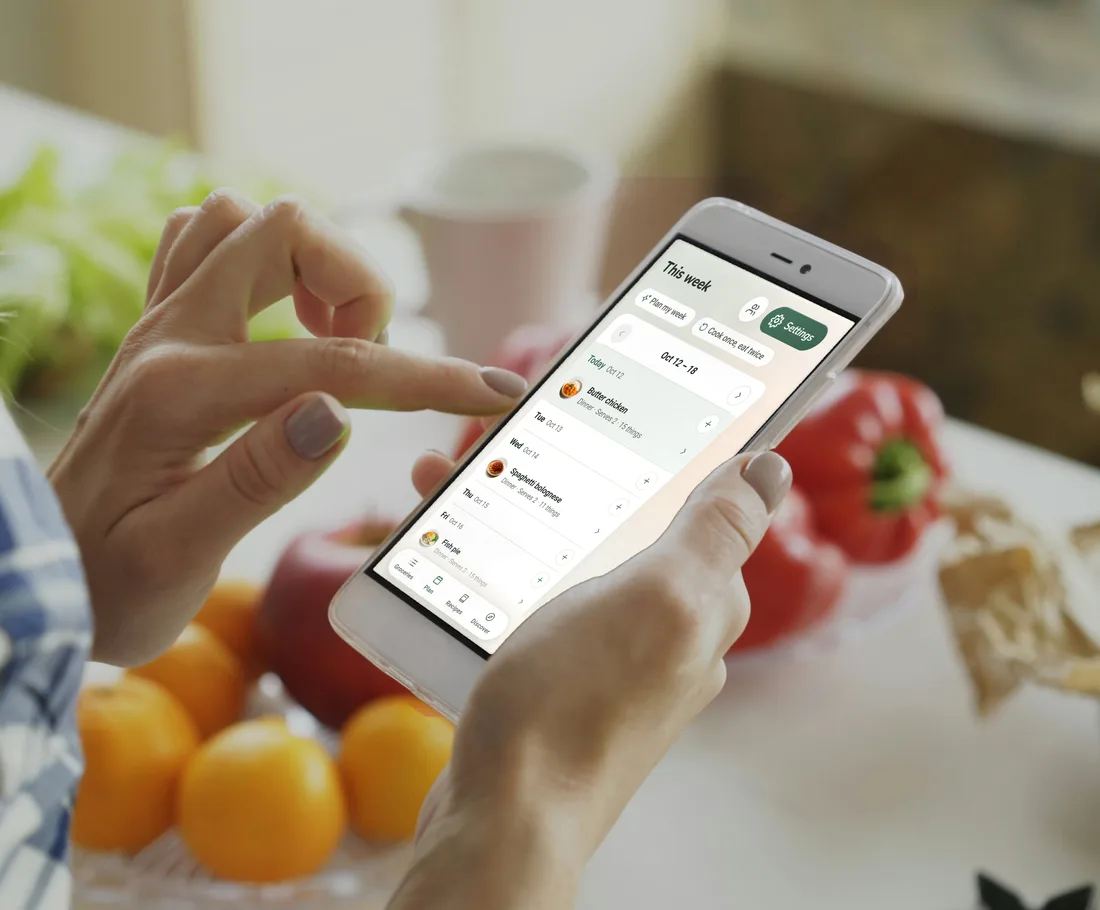
Pick a dinner for each day, from your saved recipes or just "pizza night". Then one tap puts every ingredient on the shopping list everyone at home shares.
Let Fridg plan the week for you
Not sure what to cook? One tap fills the empty days with dinners: some from your favorite recipes, some new ones that suit your taste.
Cook once, eat twice
Cook a double batch one day and eat the leftovers the next. Fridg can plan your week that way: it doubles the first day's ingredients, and the second day needs no shopping at all.
Dinner ideas when you are stuck
Ask for ideas based on what you buy and like, or browse dishes other people liked. Ideas only come when you ask, never as reminders.
Dinners everyone at home can eat
Each of you can tell Fridg what you avoid or cannot eat, and its dinner ideas for the household leave those foods out.
Shop together, from the same list
Invite the people you live with. What one of you adds, ticks off or buys shows on everyone's phone at once.
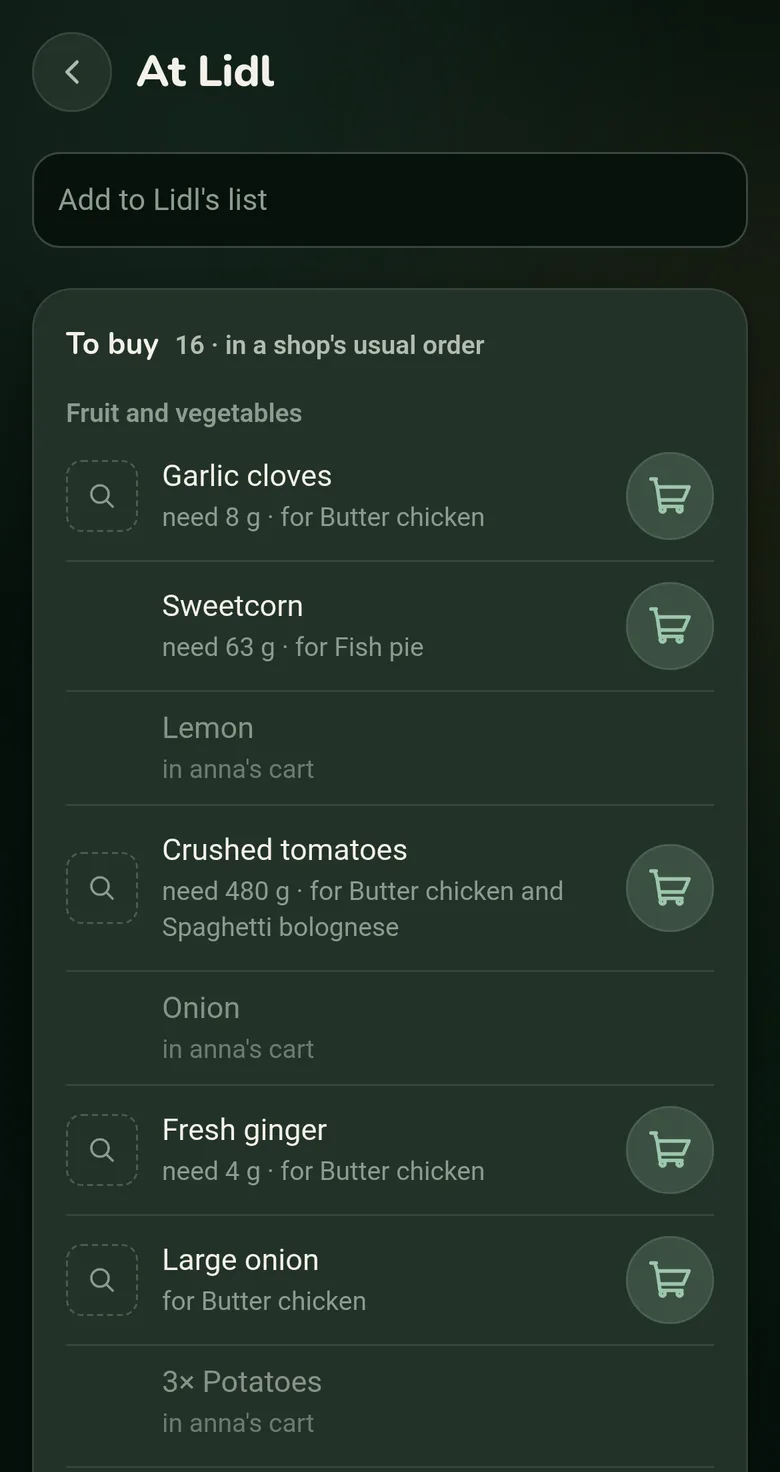
Nothing bought twice
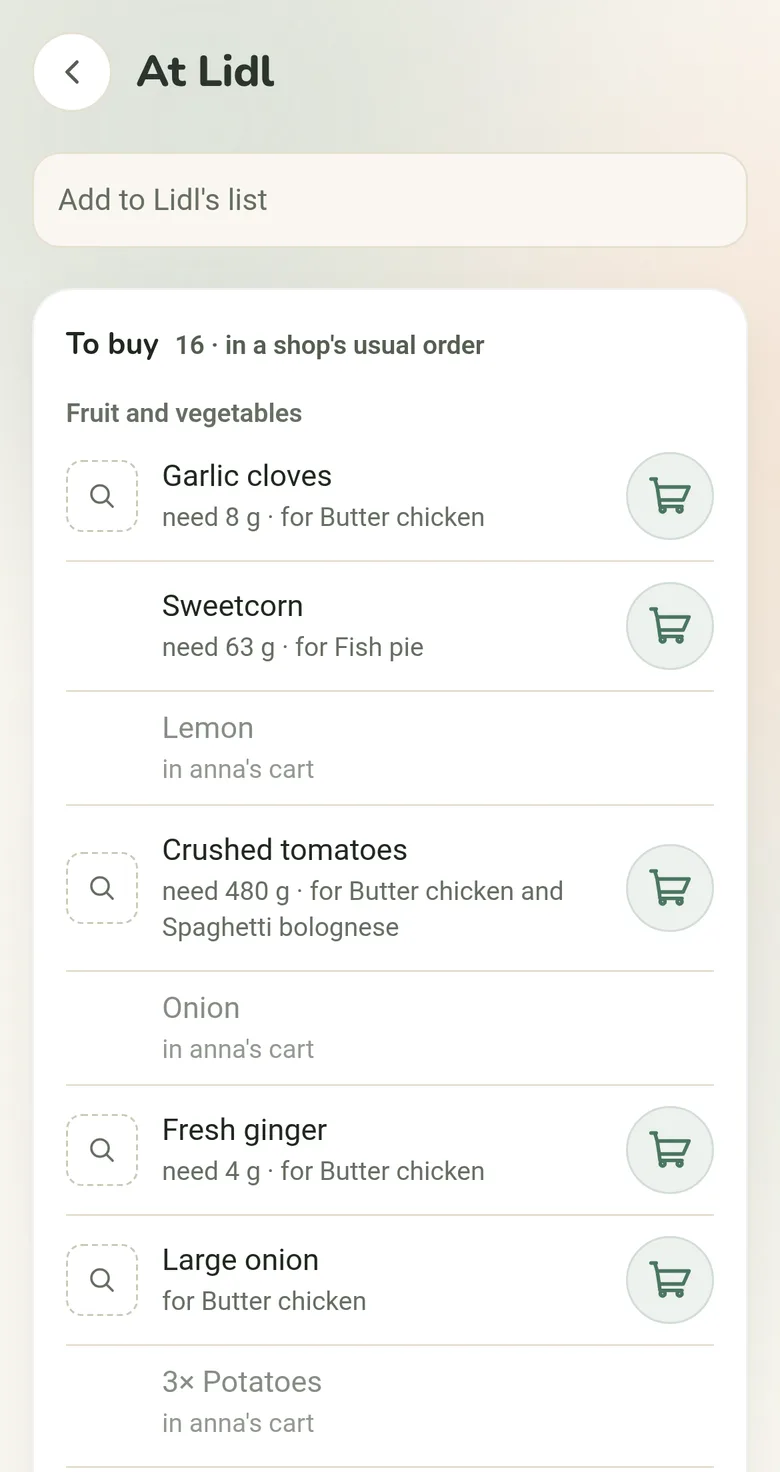
Shopping at the same time as someone else? You can see what is already in their trolley, like "in anna's cart".
The same recipes and meal plan
Everyone at home sees the same recipes and the same week of dinners, so whoever does the shopping knows what the meals need.
Works without signal
No signal in the shop? Your list still works, and your changes reach the others as soon as your phone is back online.
Join with just an email
Sign in with your email and Fridg sends you a link, so there is no password to remember. Then invite the others by email or with a link.
A list for each store, in aisle order
Shop at more than one store? Fridg keeps a list for each one and puts every item on the right list. In the shop, the list follows the aisles.
How Fridg picks the store
Everything goes to your favorite store, the one you shop at most. Fridg only puts a thing on another store's list for one of these reasons:
You moved it there before
It is cheaper there
It is that store's own brand
Your favorite store is not known to sell it
Rather keep things at your favorite store than chase a lower price? Comparing prices is a setting you can turn off. Shop at just one place? Then everything goes on one list, and nothing needs setting up first.
Your list in the order of the aisles
Fridg remembers the order you put things in your trolley at each store. Next time, your list follows that order, with no sorting by hand.
Add things any way you like
Type, scan a barcode, paste a whole list or take a photo of a paper one. As you type, the things you always buy come up first.
Shopping abroad? Type in your language
Type "milk" in a shop in Portugal and Fridg finds the "leite" on the shelf.
Where Fridg is different
What sets Fridg apart from other shopping list and recipe apps.
Recipes, meal plan and shopping list in one app
No more recipes saved in one app, the meal plan on the fridge door and the shopping list in a group chat. In Fridg the meals you plan go straight onto your shopping list, and everyone at home sees all of it.
No ads in your lists
No sponsored products, no store flyers and no ads from other companies. The only ad is a small card for one other app by the same makers. It never sits inside your lists, and one tap hides it.
Add anything in your own words
Write what you need the way you say it. Fridg never refuses a word it does not know, and never swaps what you wrote for a product you did not choose.
Built on open data
Product names and photos come from Open Food Facts, prices from Open Prices and store chains from OpenStreetMap. They are free databases that people build together, and Fridg credits each one in its settings.
Questions people ask about Fridg
Short, straight answers.
What is Fridg?
Fridg is a shopping list app for iPhone and Android that everyone at home shares, with your recipes and a meal planner built in. Save a recipe from Instagram, TikTok or any website, plan the week, and one tap puts every ingredient on your shopping list, split by store if you shop at more than one. In the shop you tick things off as they go in your trolley, and everyone at home sees it at once.
Can I share my lists with my household?
Yes. Sign in with your email, using a link Fridg sends you instead of a password, and invite the people you shop with by email or with a link. Everyone in the household then has the same lists, recipes and meal plan, and what one of you adds, ticks off or buys shows on everyone's phone at once. In the shop you can see what is already in someone else's trolley, so nothing is bought twice.
Does Fridg work in my country?
Yes, Fridg works wherever you shop. In Switzerland, Norway, Denmark, Spain, Portugal and Germany it also knows the local store chains, their own brands and everyday local dishes. A store you add starts with the usual aisle order for shops in your country, which Fridg knows for most of Europe, the US, Canada, the UK, Ireland, Australia and New Zealand, and then learns the order of your own store as you shop.
Does Fridg compare prices?
Where it can. Fridg uses Open Prices, a free database of prices that shoppers collect. When it has a price for a product at two of your stores, Fridg puts the product on the cheaper store's list and shows both prices. Today it covers Norway best, so elsewhere you will see few prices, and Fridg mostly goes by where you usually buy things. You can turn price comparison off.
What does Fridg use AI for?
Fridg uses an AI to suggest dinners and fill your week, to read a recipe from a post, a link or a photo, to change a recipe, count its calories or translate it, and to read a photo of a paper list. These go through Fridg's servers, and the privacy policy says exactly what leaves your phone. Your shopping list needs no AI: putting things on the right store's list and learning your aisles use only your household's own shopping, and importing recipes from another app's file happens on your phone.
Which languages and phones does Fridg work on?
Fridg is in English, Danish, Norwegian, Portuguese, Spanish and German. It runs on iPhone with iOS 15 or later and on Android 8.0 or later, with two columns on a tablet, light and dark mode and three text sizes. Adding by voice with "Hey Siri, add to Fridg" needs iOS 16.
Is Fridg free?
Yes, your lists and recipes stay free. That covers your shopping lists, a list for each store, sharing with your household, keeping your recipes and importing them from another app, and planning the week and putting it on your list. Some of the AI help is a free taste, like a few recipes a week saved from posts and links and the first week Fridg plans for you. Fridg Pro, bought through the App Store or Google Play, will lift those limits and add more, such as reading a photo of a cookbook page or a paper list. Pro is not on sale yet, so there is nothing to buy today.
Is Fridg on the App Store and Google Play?
Not yet. Fridg is built for iPhone and Android and is coming soon to the App Store and Google Play. There is nothing to download today, and this page will link the store listings as soon as they are live. No launch date has been announced.
Your lists stay on your phone
Your lists are saved on your phone and work without a connection. Without an account, they never leave it. You only sign in, with just your email, when you want your lists on another phone or shared with your household.